Against vibe coding
November 14, 2025
I have been exploring the use of AI tools to assist in software engineering tasks. AI coding tools are absurdly powerful. They’ve changed how I work more than any technology shift in the last decade. But the way they’re being marketed - “just vibe and ship!” - sets people up for failure. You’ll get slop. You’ll waste time. You’ll debug nonsense.
The following post are some tips/tricks/learnings I picked up using these tools for a while. I hope these are useful to you and let you skip some of the mistakes I made.
The tool
The mark of a good engineer is embracing new tooling and learning to use it effectively. Every few years something shifts - new languages, new frameworks, new paradigms. AI coding is like that (but this time VCs and big corps are throwing bajillions of dollars at it). If you think about it as another tool in the toolbox, you will get much further than treating AI like a replacement for a software engineer.
I tried Cursor, Kiro, Windsurf, Gemini CLI, Codex, Aider and I always go back to Claude Code.
- I like my editor setup and I do not want to switch editors just to use some AI features. So all the VScode forks (Cursor, Kiro etc) are a major pain for me to use
- I’m very comfortable in a CLI and have lots of tools/scripts/aliases/… built up over the years. Using a CLI-based AI tool lets me leverage all of that
- Claude Code is miles ahead of the rest feature wise. Plan-mode is a killer feature, but the other features around context management are super useful!
A lot of my experience is with Claude Code, but the principles apply to any AI coding tool.
Context engineering beats prompt engineering
When AI tools first rose to prominence, people figured out lots of tricks to get it to behave better than standard. “You are a super smart senior engineer, …“. These tricks don’t really do much anymore in modern models. They are all trained to behave like senior engineers (or senior marketers, writers, whatever) already.
The real power comes from context engineering. As a experienced engineer deeply familiar with the codebase I am working on, I already know how ‘feature x’ should be implemented. The hard part is getting that information out of my brain and into the context window. A lot of my prompts looks something like this, where I provide pointers to relevant info for the model.
We are going to add a new feature that does X.

Look at how we implemented feature Y before at ~/code/project/src/feature_y you should follow the same principles.
Be sure to include the middleware from ~/code/project/src/middleware/important_middleware
You should also write tests like the ones in ~/code/project/tests/test_feature_y
We should leverage this thing from the framework: https://cool-framework.com/docs/important_thing
This would be sent in plan-mode, Claude will follow all of my pointers and then present to me how it will implement the changes. I can then correct it, or approve the plan.
All that said, you still have to be mindful about how you word your prompts. I don’t have much advice here because a lot of it is it depends and I have noticed that the methods change dramatically when you switch models (or upgrade to newer versions of the same model). As you use the tools more, you will get a feel for what works and what doesn’t.
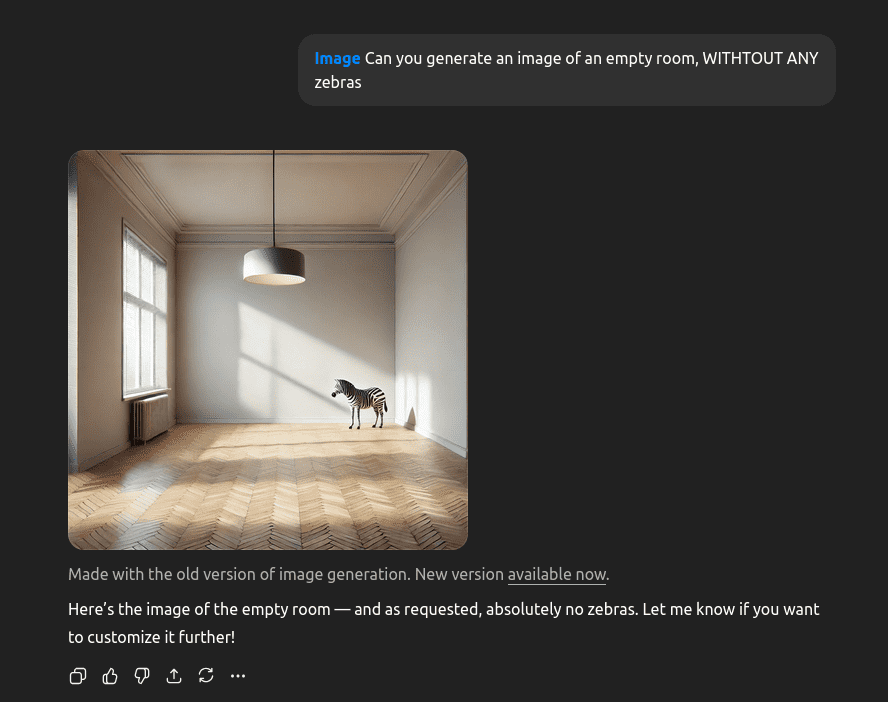
One tip that has always applied though is that you have to tell the AI what do do, not what to not-do. If you zoom in enough, these LLMs are still auto-complete on steroids. Telling it “Don’t do X” still puts X in the context window and it makes it more likely to do X.
Context poisoning
Once you start getting comfortable with context engineering, you will start to notice that agent context mechanics are make or break for good results. A problem I have run into often is something I call ‘context poisoning’. This is where AI runs into some problem, confidently makes a wrong assumption and then builds on that wrong assumption for the rest of the conversation. If you’re not paying attention to this, it can lead to a lot of wasted time and potentially very dangerous bugs. I’ve seen an agent tell me “this isn’t vulnerable to SQL injection because I found earlier that the app can’t connect to the database, so there’s no problem.”.
You can mitigate this problem by paying attention to what the AI does and starting a fresh session as soon as it goes off the rails. I’ve found that correcting the agent is not always effective, I suspect because the bad assumption still lives in the context window. No zebras.
Claude Code has the concept of ‘agents’, they have a very neat characteristic where an agent runs in it’s own context window. It will get some initial info from the main context (but not the whole conversation history), the agent will do whatever it needs to do (looking at code, running tools, …) and finally it will give some output. This is very powerful if you know how to use this. I have a ‘review-agent’ and a ‘debugging-agent’ specifically to avoid the context poisoning problem. It sets up the agent to do a clean review or investigation. This has provided much better results and has frequently called out nasty workarounds/hacks. On the other side, I have also experimented with a ‘implementing-agent’ that tries to implement features end-to-end. This had much worse results because it would ‘forget’ about the implementation plan (the input to the agent is not detailed enough) and the visility of what it does is very bad with agents.
I recommend reading how your preferred AI tool handles context and what tools it offers. Learning how to use Claude commands, agents, hooks and skills were a huge level-up for me.
Long conversations are bad
The longer a conversation goes, the worse AI agents become. This is simple to explain: a fresh conversation has a clear set of instructions. It has a system prompt augmented by your user or project instructions (CLAUDE.md files). As the conversation progresses, the context windows starts to fill up. At a certain point in time, the agent has to start dropping information. Good tools are smart about this, they will not just drop information but they will summarize info so it takes up less space. But still, the longer the conversation, the more likely it is that important info gets dropped or summarized away.
Practical example, every AI agent has instructions to avoid using emojis. It’s a clear indicator of AI slop, so the system prompt has instructions to avoid them. When I see Claude replying to me with something like ”🚀 All features are finished, 🚢 production ready!” I know it’s time to clear the context and start fresh. Similarly, when Claude starts swearing “Oh shit, I found the problem!” it’s time to pack it up.
Good software engineering practices matter even more
Tell an AI tool to implement a feature and it will happily spit out a bunch of files, hundreds of lines of code and none of it will work! Trying to review the first pass yourself will quickly make you burnt-out using these tools.
Whenever I start using AI in a project, my first goal is to figure out ways for the AI to test it’s own work. This depends on the project of course but if you’re working in a serious environment, you will likely already have the following available; a compilation step, a linter, tests. These are the first defence against AI nonsense. If it doesn’t compile, it’s not even worth me looking at it. (this holds true for non-AI changes too 😉).
The neat thing about LLMs is that you can augment these testing loops with non-deterministic things. For example, I really like using Postgres in my project, so my CLAUDE.md files will usually have some form of “use psql to investigate the data”. This lets the AI explore the database state and reason about it. You can do similar things with web UIs (using something like Playwright MCP) or other systems.
There is a balance to be struck though, because LLMs will cheat, lie and be lazy. If you give it too much rope, it will take it. For example, if you tell it to “make sure the tests don’t fail” it will find creative ways of achieving that goal, like deleting the tests.

The tried and true best practices of code reviews, good documentation, tests, solid architecture etc are more important than ever when using AI tools. Don’t skimp on them!
Build your own tools and workflows
When I want to learn how to use something new, my first instinct is to research how other people use it. I’ll look up documentation, read blog posts and watch videos. I might even find some tools or scripts on Github and install them. All AI coding tools let you write custom commands, custom agents, hooks, claude.md files and so on. There are projects on GitHub with 30+ agents, elaborate templates, whole simulated company structures with developers, project managers, QA and so on. Do not download these.
You’ll never learn how the core tool works. You’ll never develop that feel for guiding the agent. And critically - someone else’s workflow is not your workflow. Web apps need different tooling than ML projects. Your deployment setup is different from mine. Your testing philosophy varies. Templates built for someone else’s problems won’t solve yours.
Start fresh, once you notice that you are retyping similar prompts, that’s a signal that you should start writing your own custom commands or agents.
I have my own set of helpers that I have built up over time. Some are simple commands that wrap common tasks (like “create a new feature branch, create a PR and so on”). Others are more elaborate agents that do specific tasks (like reviewing code, or investigating bugs). These are all tailored to my workflow and the projects I work on. They would not be very useful to anyone else.
Be selective when adding MCP
MCP (Model context protocol) is a standard for connecting AI applications to external systems. It can be very useful in aiding context engineering by letting the AI tool pull in relevant information from external systems. For example, you can connect your issue tracker, your database or give the AI control over a browser to test your frontend.
I used to go all-in on MCP servers, adding lots to my configuration. Over time I have reduced this to only one or two MCP servers that I use all the time. The reason is simple, they fill up your context window. The image below shows a conversation which has one single MCP server added. This single MCP server (with all the tool definitions and descriptions) takes up 6.8% of my context window! This is before I have even run any of the tools
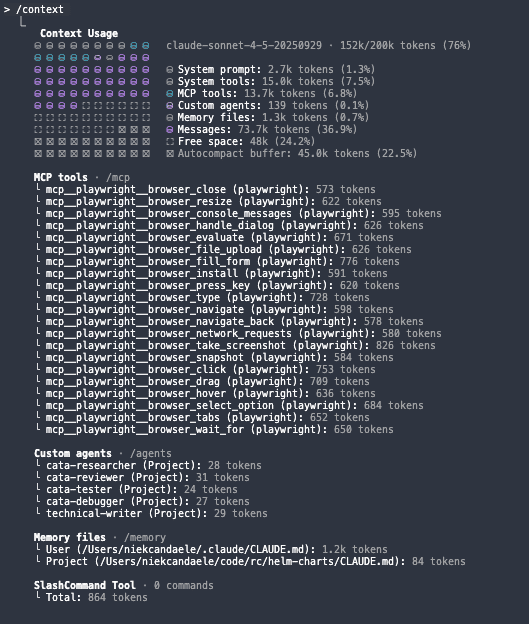
I have had much more success by directing the agent to use tools I already have installed on my system. Something like "use the available unix tools like glab jira gh jq helm" gives the agent access to a wide variety of information without bloating the context window. The agent is smart enough to figure out how to use these tools effectively (eg gh --help).
Conclusion
I hope this was useful to you! AI coding tools are powerful, but they are not magic. You have to learn how to use them effectively. Treat them as another tool in your toolbox, be aware what is in context and build good workflows.